
Download Stickman – 2D animation, character animation, mobile animation app, create animations, animation tool, stickman app, mobile creativity tool
Overview
Stickman is a mobile application designed to simplify the process of creating 2D animations directly from smartphones and tablets. Tailored for users of all experience levels, the app enables quick and intuitive animation creation, allowing individuals to bring their ideas to life in just a few minutes. Whether used for personal expression, educational storytelling, or content creation, Stickman serves as a lightweight yet powerful tool in the mobile productivity ecosystem. Its primary purpose is to lower the barrier to entry for animation, offering an accessible platform where even novices can produce visually engaging content without prior technical knowledge.
The app targets a broad audience, including students, educators, hobbyists, and independent creators who seek a fast and efficient way to visualize narratives or explain concepts through motion. With a focus on simplicity and creativity, Stickman integrates essential animation tools into a user-friendly environment, making it a valuable asset in digital storytelling and educational technology. The developer, Stickman Studio, has positioned the app as a utility for mobile creativity, emphasizing ease of use and immediate results. Although specific details about the studio’s background are not provided, the app’s longevity—first released in 2011—suggests a stable and enduring presence in the mobile app space.
Real-world use cases include classroom presentations, social media content, short video stories, and creative experiments. The app’s ability to facilitate rapid animation production supports timely content delivery, which is especially useful in fast-paced digital environments. As a free tool with a modest file size of 15.2 MB, Stickman remains accessible across a wide range of Android devices, reinforcing its role as a practical and inclusive animation solution.
Key Features & Functionality
Stickman offers a suite of features designed to streamline the animation creation process while maintaining creative flexibility. The app’s core functionality revolves around its user-friendly interface, which minimizes complexity and enables immediate engagement. Users can begin creating animations without needing to navigate extensive menus or settings, making it ideal for beginners and time-constrained creators alike.
- User-Friendly Interface: The layout is intuitive, with clearly labeled tools and drag-and-drop functionality. This design reduces the learning curve and allows users to focus on creativity rather than technical navigation.
- Extensive Character Library: A rich database of pre-animated characters is available for instant use. These characters can be dragged into scenes and customized with minimal effort, significantly speeding up the animation workflow.
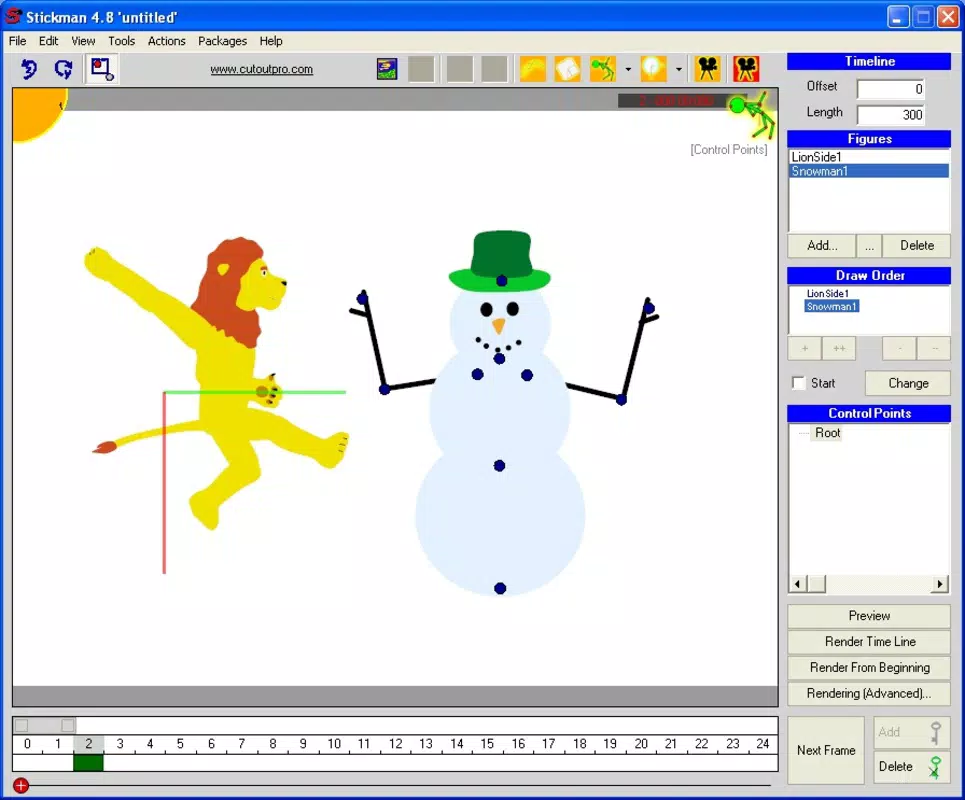
- Timeline Animation Control: The timeline feature allows precise control over character movements and timing. Users can adjust frame-by-frame sequences, layer multiple characters, and synchronize actions for complex scenes.
- Versatile Animation Options: From simple movements to layered, multi-character sequences, the app supports both basic and advanced animation styles. This adaptability makes it suitable for a wide range of projects, from playful animations to structured educational content.
- Quick Creation Process: The app is optimized for speed, enabling users to produce complete animations in minutes. This efficiency is particularly beneficial for content creators who need to generate frequent or time-sensitive material.
For example, a teacher might use Stickman to create a short animated explanation of a scientific process, while a student could use it to illustrate a story for a school project. The app’s design encourages experimentation and immediate feedback, fostering a dynamic creative process.
Interface, UX & Performance
The user interface of Stickman reflects a minimalist design philosophy, prioritizing clarity and ease of access. Navigation is straightforward, with tools and menus arranged logically to support a smooth workflow. The visual style is clean and uncluttered, minimizing distractions and helping users focus on the animation canvas.
Interaction is primarily gesture-based, allowing users to drag characters, adjust timing, and manipulate scenes with intuitive touch controls. The app maintains responsiveness across various device categories, though specific performance metrics were not provided by the developer. However, the relatively small file size of 15.2 MB suggests optimized resource usage, which likely contributes to stable performance on mid-range and older Android devices.
Although the developer did not list formal performance metrics, the app’s long-standing presence and continued availability indicate a level of stability and reliability. Users can expect consistent behavior during animation creation, with minimal lag or crashes during typical use. The interface adapts well to different screen sizes, ensuring usability on both smartphones and tablets.
Overall, the user experience is designed around accessibility and speed, aligning with the app’s core mission of enabling quick and effortless animation. The lack of complex settings or overwhelming options reinforces its appeal to non-technical users seeking a simple yet effective tool.
Platform Compatibility & Technical Requirements
Stickman is available exclusively on the Android platform, making it accessible to users of Android smartphones and tablets. The current version is 1.0.0, with a file size of 15.2 MB, which indicates a lightweight and efficient application. This compact size ensures compatibility with a broad range of devices, including those with limited storage and processing power.
The developer did not specify minimum OS requirements or compatibility details beyond the platform. As such, users should verify device compatibility through their app store. While the app has been available since 2011, updates may be infrequent, so users should ensure their device meets the latest system standards for optimal performance.
Given the app’s age and continued availability, it is likely compatible with Android versions from the past decade. However, without explicit documentation, users are advised to test installation on their specific device. The app does not require internet access for core functionality, making it suitable for offline use.
Pros and Cons
Pros
- Free to download and use, making it accessible to all users.
- Lightweight file size (15.2 MB) ensures compatibility with older and low-storage devices.
- Intuitive interface designed for beginners and non-technical users.
- Fast animation creation process—projects can be completed in minutes.
- Extensive library of ready-to-use animated characters.
Cons
- Platform availability is limited to Android only.
- Specific technical requirements were not listed by the developer.
- Limited information on update frequency or future development plans.
- No integration with cloud storage or sharing platforms mentioned.
- Interface may appear basic compared to modern animation tools.
FAQ
Is Stickman safe to download and install?
Yes, Stickman is a free mobile app available through official Android channels. The app is distributed by Stickman Studio and does not require special permissions beyond standard device access. As with any app, users should download from trusted sources to ensure security.
Can I use Stickman offline?
Yes, the app does not require an internet connection to create or view animations. All tools and assets are stored locally on the device, making it ideal for offline use.
Is Stickman available for iOS devices?
Currently, Stickman is only available on the Android platform. There is no official iOS version available at this time.
How often is Stickman updated?
The developer has not disclosed update frequency. The app’s version is 1.0.0, and release history suggests infrequent updates, though it remains functional on modern devices.
Can I export my animations from Stickman?
While the app’s export capabilities were not detailed, most animation tools of this type support video export. Users should check the app’s in-app settings to confirm available export formats.
Final Thoughts
Stickman stands out as a dedicated, lightweight tool for mobile 2D animation, offering a rare balance between simplicity and functionality. Its user-friendly design, rapid creation workflow, and accessible character library make it a compelling choice for educators, students, and casual creators seeking to produce animated content without technical barriers. Despite its age and limited platform availability, the app remains relevant due to its core strengths: speed, ease of use, and affordability.
For anyone looking to explore animation on a smartphone or tablet, Stickman delivers a straightforward and effective solution. It’s particularly valuable in educational and creative environments where quick visual storytelling is essential. The free price point and small size further enhance its appeal, making it a practical addition to any mobile productivity toolkit.
Download Stickman now


